
If you’ve ever tried to upload a JavaScript (JS) file to your WordPress site and saw the message “Sorry, you are not allowed to upload this file type.” you’re definitely not the only one.
JavaScript (JS) files are commonly used to add custom functionality, interactive elements, and animations to a website. However, if you try to upload JavaScript (JS) files to WordPress, you might run into an error. That’s because WordPress blocks certain file types by default—including .js files—as a security precaution.
In this guide, we’ll walk you through how to safely upload JS files to WordPress step by step. Let’s get started!
Table of Contents
What is a JS File?
A JS file is a file that contains JavaScript code. JavaScript is a popular programming language used to make websites interactive and dynamic.
For example, a JS file can:
- Add sliders, pop‑ups, or animations to your pages.
- Validate forms before they’re submitted.
- Load extra content without refreshing the page.
In simple words, while HTML controls the structure of your site and CSS handles the design, JavaScript (JS) brings your website to life with interactive features.
That’s why you might want to upload a JS file in WordPress—to add custom scripts that improve how your site looks or works.
Why Use JS Files in WordPress?
JS files are a powerful way to add custom functionality and make your WordPress site more interactive. Instead of relying only on plugins or built‑in theme features, you can use your own JavaScript to create unique effects and improve user experience.
Here’s why JS files are often used in WordPress:
- Add Interactivity: Create sliders, image galleries, pop‑ups, or animations that make your site feel alive.
- Improve User Experience: Validate forms, load content dynamically, or show custom messages without page reloads.
- Customize Beyond Plugins: Add small tweaks or special effects that plugins might not offer.
- Optimize Performance: Use lightweight, targeted scripts instead of installing large plugins for simple tasks.
In short, uploading JS files lets you go beyond basic design and build a more engaging, responsive WordPress site.
Why WordPress Blocks JS Uploads by Default?
WordPress takes security very seriously. To protect websites from malicious code, it only allows certain safe file types—like images and documents—to be uploaded.
A JS file is powerful because it can run scripts directly in a browser. Unfortunately, that also means a harmful JS file could be used to inject malware or steal data. To prevent this risk, WordPress blocks JavaScript uploads by default.
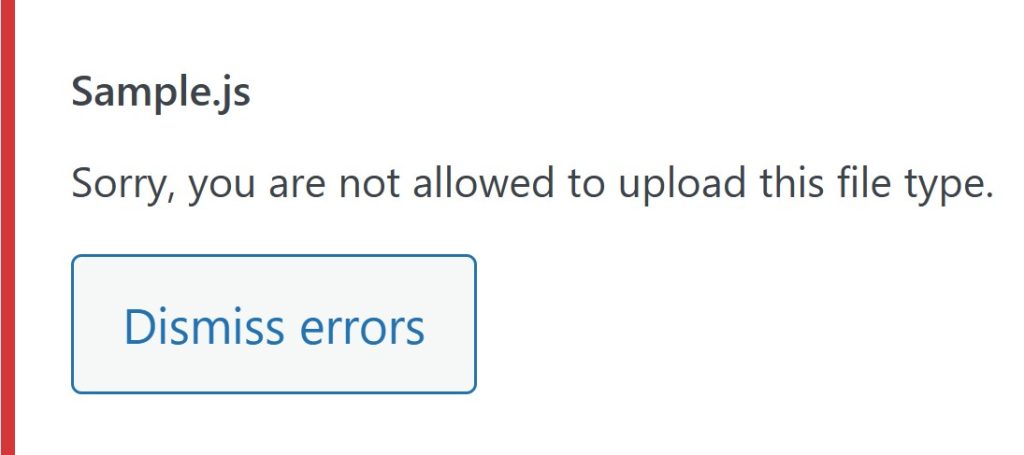
So, when you try to upload a JS file, you’ll see an error like:
“Sorry, you are not allowed to upload this file type.”
This restriction is a safety measure. But if you’re uploading a trusted JS file from a secure source, you can enable JS uploads safely using a plugin like Upload Any MIME Types—without changing core WordPress settings.
How to Upload JS Files to WordPress?
Uploading JS files to WordPress isn’t allowed by default because of security restrictions, but with the right method, you can safely enable this option.
Here’s how you can upload JS files to your WordPress site without putting your website at risk.
Using WordPress Plugin
- Install Plugin: Go to your WordPress dashboard, then navigate to Plugins > Add Plugin. Search for “Upload Any MIME Types“, install, and activate the plugin.

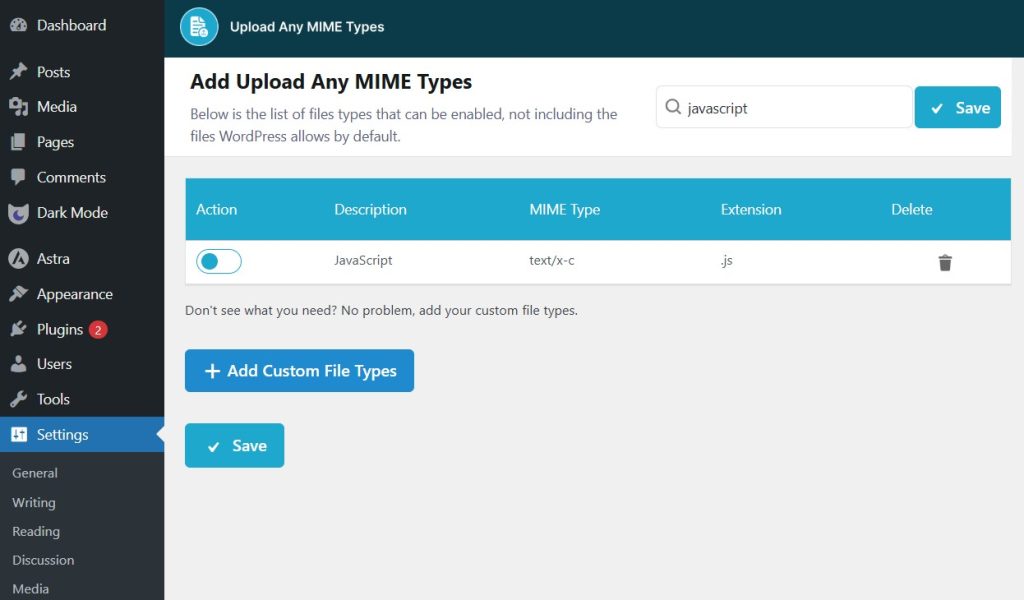
- Enable Desired MIME Types: After activation, go to the Settings menu and find the plugin settings. Search for the MIME type you want to allow and toggle it to enable.
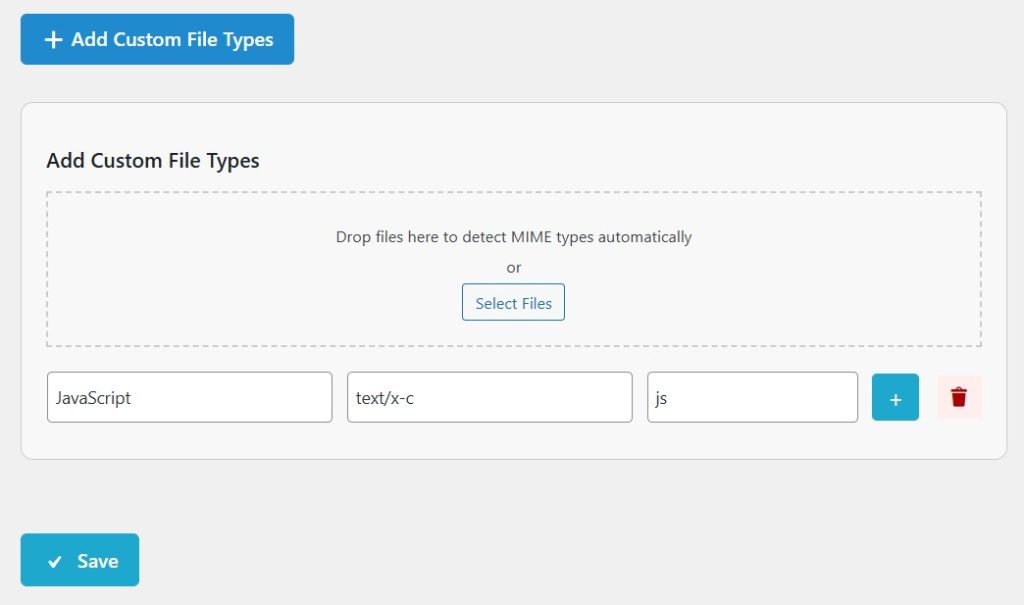
- Add Custom MIME Types: If the file type you need isn’t listed, you can easily add a custom MIME type or upload one using the uploader.
Using Code Snippets
To safely enable JS file uploads in WordPress, you can add a small code snippet to your theme’s functions.php file. This snippet will allow WordPress to recognize JavaScript files while maintaining security measures.
Follow the steps below accordingly:
Navigate to Settings > Theme File Editor > function.php > paste the below snippet:
//for js files
function allow_js_uploads($mimes) {
    // Allow JS files
    $mimes['js'] = 'text/plain';
    return $mimes;
}
add_filter('upload_mimes', 'allow_js_uploads');
// Optional: Sanitize JS files for added security
function sanitize_js_file($file) {
    // Add any sanitization logic if needed, like scanning or validating the JS content
    return $file;
}
add_filter('wp_handle_upload_prefilter', 'sanitize_js_file');
This snippet does two things:
- It allows JS files by adding them to the list of permitted file types in WordPress.
- It provides an optional handling or filtering process to help ensure the JS files are safe before being uploaded.
Once enabled, you can upload JS files just like other media types, but always make sure to use trusted sources to avoid any security risks.
Conclusion
JS files can be a real game‑changer for your WordPress site, adding custom features and interactive elements that make your website stand out.
Although WordPress blocks JS uploads by default for security reasons, you can enable this feature safely with just a few simple steps.
Whether you choose to adjust settings or use a reliable method to allow these files, adding JS opens up endless possibilities for functionality and design.
With the right precautions, JavaScript can transform your site, making it faster, more dynamic, and truly unique. So, take the step and give your website the upgrade it deserves!
FAQs & Answers
Can I upload .js by adding code?
Yes, you can add a snippet to your theme’s functions.php using the upload_mimes filter to allow .js. Be careful to only allow trusted files.
Is allowing .js uploads risky?
Yes, it can be risky if the .js file includes malicious or insecure code. Always upload only from sources you trust and ideally sanitize or inspect the file content.
Will .js files show up in the Media Library?
Yes, once allowed, you can upload .js via the Media Library like other file types. You can then link to or enqueue the script from your theme or plugin.
Will JS uploads work on all hosting setups?
Not always. Some hosting providers may block certain file types or have security rules that prevent uploading .js. You may need to check with your host.
Can I limit which users can upload .js files?
Yes. In code, you can check user capabilities (e.g. only administrators). This ensures that only trusted users can upload executable files.
What’s the easiest way to allow .js uploads securely?
Install a plugin that lets you enable .js in the MIME type settings rather than messing with code. Use that and only allow .js for users who need it. Upload Any MIME Types helps with this.