 Gallery
 Gallery
You can add a grid lightbox popup photo gallery in your page/ post using the gallery options of the plugin. The gallery will be generated based on the folders that you select.
Optimize Your Gallery

Customize and organize your Dropbox file gallery with flexible layout options, then effortlessly showcase it on your website for a seamless visual experience.
Awesome Looking Masonry Grid

Display your Dropbox cloud files in a visually striking masonry-style grid. This dynamic layout automatically arranges your content for a clean, organized, and modern look.
Inline Lightbox File Preview
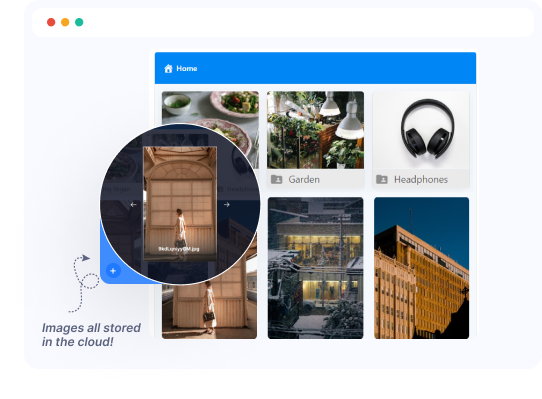
Instantly preview your Dropbox files in a sleek lightbox, right within the grid layout—no need to open new tabs or leave the page. Clean, fast, and user-friendly.
Photoproofing

Let clients review, select, and submit their favorite photos directly from the gallery. The Gallery Module’s built-in proofing feature simplifies the approval process and eliminates back-and-forth emails.
Ready to Integrate Google Drive into Your Website?
Best Google Drive cloud solution plugin for WordPress to integrate your Google Drive files directly into your WordPress Website.