Radio Player is a simple, easy-to-use, user-friendly, and fully customizable web radio player for your WordPress website. In this doc, we will break down how you can upgrade Radio Player from a single-site license to a multi-site license just by paying the difference.
Note: Upgrading a license by paying only the difference is available within 30 days of the original purchase.
Please follow the below steps to successfully upgrade your Radio Player multi-site license easily.
Step 1: Visit the Upgrade Page
- Open your web browser and go to the following link: https://checkout.freemius.com/mode/dialog/plugin/8684/plan/14508/
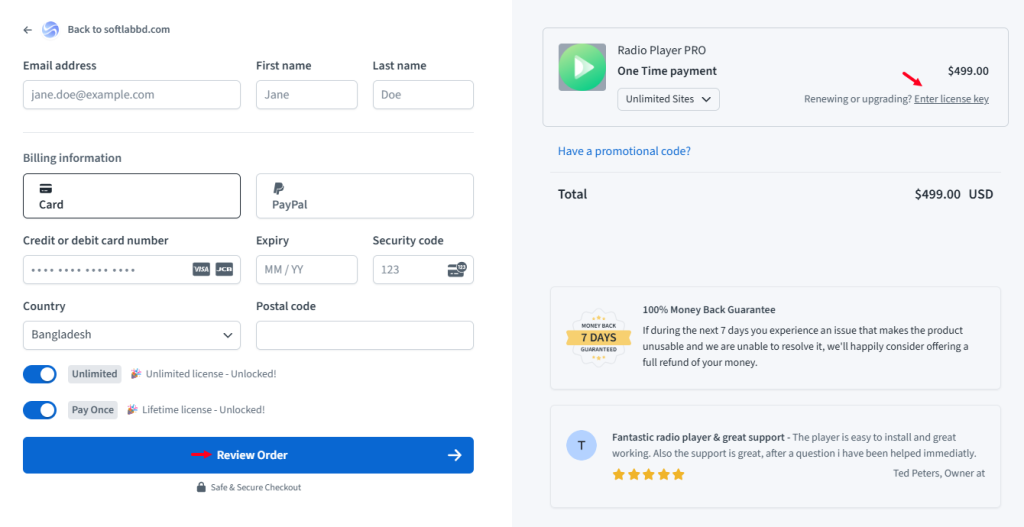
Step-2: Select the Plan and License
- Click on the “Renewing or upgrading a license?” button, and enter your previous license key. Select your multi-site license preferred option, and select the package annually or lifetime.
- Enter your payment details.
- Click on the Review Order button.
- Complete the other necessary steps.
 .
.
Note: If you face any issues or have further questions regarding the license upgrade process, please feel free to contact our support team for further assistance.