Essential Addons for the Contact Form 7 plugin’s Entry Restrictions feature controls and limits form submissions from Contact Form 7. It helps set limits on form submissions. You can manage and configure restrictions easily from the WordPress admin area.
To implement & manage entry restrictions for form submissions, follow the guidelines below.
Make sure you have installed both Contact Form 7 & Essential Addons Contact Form 7 (PRO) plugins inside your WordPress.
Enable Entry Restrictions
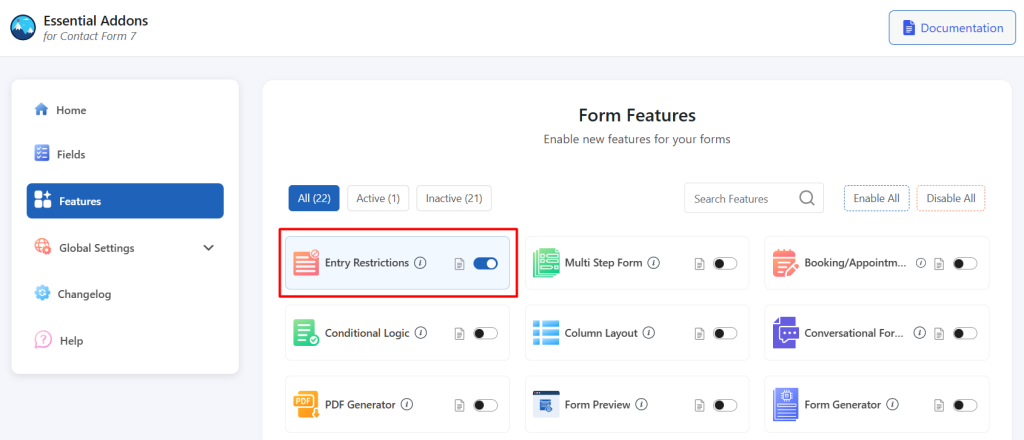
You must enable the Entry Restrictions feature to control and limit Contact Form 7 form submissions. To do that, follow the steps:
- Navigate to the Contact Form 7 menu.
- Click on Essential Addons.
- From the Features tab, enable the Entry Restrictions.
Configure Entry Restrictions Additional Settings
To configure additional settings for Entry Restrictions, follow the guidelines:
- Navigate to any existing form or create a new one.
- Enable Entry Restrictions: Enable/ disable the Entry Restrictions on Contact Form 7.
- Entry Restrictions Limit: Limit the number of times a form can be submitted.
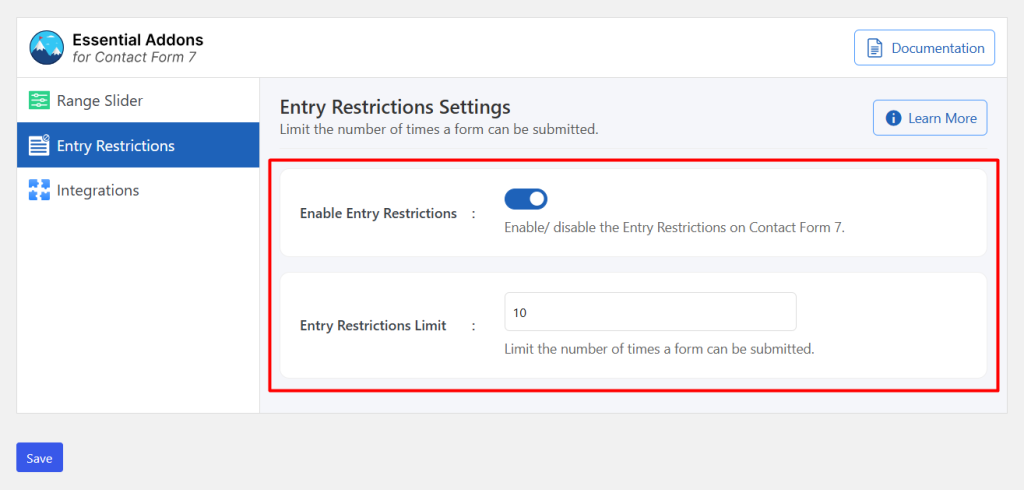
Once the maximum number of submissions is reached, the form will no longer accept new entries, and a warning message will be displayed.
Output
